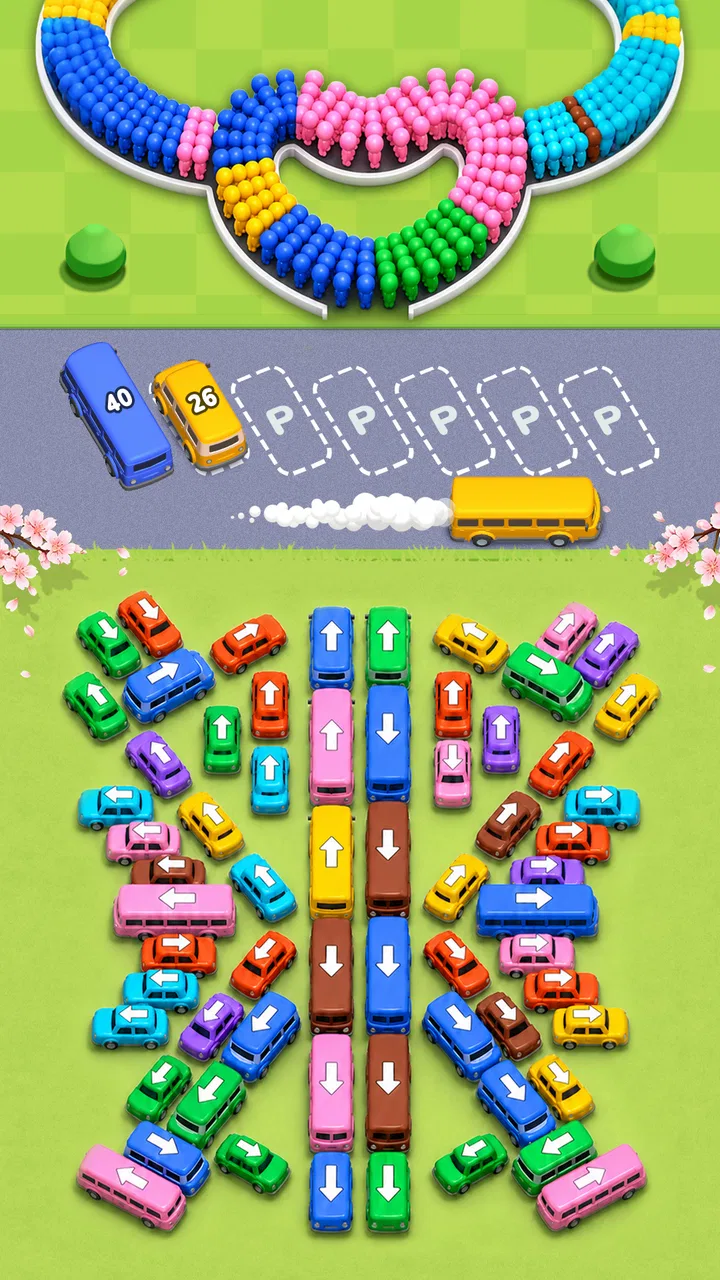
Bus Crowd - Traffic Jam
- 4.4
- Rating
- 500.00K
- Installs
- Free
- Price

 Analysis by App-foxy
I spent time with Bus Crowd as a light, casual puzzle game, paying particular attention to how comfortable it feels to read, control, and play in different everyday situations. Its central idea is easy to understand: arrange clever moves around crowded buses and clear each puzzle through a smooth sequence of decisions. That simplicity makes it approachable, but the experience is not completely friction-free for every player or every setting.
The game is free to download, with optional in-app purchases ranging from $1.99 to $99.99 per item. It is rated for Everyone, runs on Android 8.0 or later, and comes from Hyper Surfer Games. The current release is version 1.1.3, while its listing shows a 4.4 average from around 700 ratings and more than 500K installs. Those figures suggest a healthy audience, but my recommendation is based more on how the puzzles behave in actual short sessions than on popularity alone.
How Bus Crowd handles reading and navigation
I look at reading and navigation as part of the puzzle, not just as a way to reach it. The key practical question is whether I can keep the whole bus arrangement in view and make deliberate choices without rushing, especially on a smaller screen. That framing helps explain why the simple premise can feel welcoming while some boards still ask for careful visual attention.
You May Also Like

 AccuWeather: Weather Radar
AccuWeather Review: A Quick, Clear Forecast for Everyday Decisions
For everyday plans, the best forecast is the one you can understand quickly. AccuWeather makes rain timing, radar, and local conditions easy to act on, with a few trade-offs.

 Hill Climb Racing
Why Hill Climb Racing Still Turns Crashes Into One More Run
A tiny car, a bumpy hill and one more upgrade: Hill Climb Racing keeps resurfacing because its simple chaos makes every near-miss feel personal.

 AliExpress - Shopping App
AliExpress Makes Global Shopping Feel Personal, but Shoppers Bear the Risk
AliExpress turns a global marketplace into a pocket-sized discovery engine. Its reach is useful, its shopping loop compelling, and its trade-offs easy to miss.

 Lords Mobile: Kingdom Wars
Lords Mobile Is a Kingdom-Building Routine, Not a Quick Match
A case-by-case verdict on the building, battles, device demands, and social commitments that make Lords Mobile rewarding for some players and exhausting for others.

 PDF Scanner app - TapScanner
TapScanner Makes Paperwork Easier to Capture, Check, and Share
TapScanner makes scanning with a phone feel less like a rescue operation and more like a dependable step in getting work done. Its capture tools are useful, though not flawless.

 Block Blast!
Block Blast! Shows How Much a Puzzle Game Can Leave Out
A quiet grid game shows why puzzle players increasingly value instant clarity, repeatable skill and low-pressure play—and where the genre still needs to catch up.
More From Our News Desk
View All News


A clear premise that takes little explaining
The strongest accessibility advantage is the straightforward visual goal. I never needed a long tutorial to understand that the buses, passengers, and available spaces had to be managed in the right order. The design puts the puzzle itself at the center, so a player who already enjoys casual sorting or traffic-style challenges can begin quickly.
That matters for people who do not want to learn a complicated control scheme before relaxing with a game. It also helps when the player is tired, distracted, or introducing the game to someone who plays only occasionally. The basic interaction is easier to grasp than a strategy game with several menus, resources, and layered rules.
Navigation also benefits from the short-session nature of the format. I could open a puzzle, study the arrangement, make a few moves, and stop without needing to remember a large campaign structure. For a commuter, a parent waiting during an appointment, or someone looking for a brief mental break, that limited commitment is a real strength.
Where visual clarity becomes important
Even a simple puzzle can become difficult to read when several colorful elements occupy the same screen. Bus Crowd relies on the player distinguishing objects, spaces, and movement possibilities at a glance. That is pleasant when the board is uncluttered, but players with low vision, color-vision differences, or difficulty tracking small visual details may need more time than the relaxed presentation suggests.
I found that the best approach was to pause mentally before touching anything. Instead of reacting to the most obvious bus, I scanned the whole board and looked for blocked routes or spaces that could become useful later. This is more than a strategy tip: it reduces the need for rapid visual switching and gives players who process information more slowly a fairer way to approach each puzzle.
The game feels more readable when played on a comfortably sized screen rather than a very small phone. I would also recommend increasing the device’s general display size if needed, provided that the operating system still leaves enough of the board visible. That adjustment may help text and icons, although it cannot change the underlying visual density of the puzzle itself.
Navigation for players who prefer low cognitive load
Bus Crowd is a better fit for someone who likes one focused task than for someone seeking a broad, story-driven game. There are no complicated character builds or large inventories competing for attention in the core concept. The player can concentrate on the current traffic arrangement and work toward a clean solution.
That focus is useful for players who become overwhelmed by busy interfaces. At the same time, the puzzle still asks for planning. It is not an automatic matching game where every move is equally safe. A player who struggles with working memory may find it helpful to identify one immediate objective at a time: free a particular lane, make room for a bus, or avoid sealing off the remaining space.
My practical advice is to treat each board as a visual checklist. First identify the buses that can move safely, then note which spaces must remain open, and only afterward commit to a chain of moves. This turns a potentially confusing screen into a sequence of smaller decisions without requiring fast reactions.
Motor and sensory considerations
The game’s casual puzzle format should appeal more to players who prefer deliberate taps than to players looking for rapid action. The main challenge comes from choosing correctly, not from steering through a fast level or repeatedly pressing a button under pressure. That makes it suitable for relaxed play and for people who would rather avoid reflex-heavy mobile games.
However, deliberate play does not automatically remove motor barriers. A crowded board may require accurate taps on particular buses or spaces, and a player with tremors, limited dexterity, or difficulty targeting small objects could occasionally select the wrong element. I would play with the phone supported on a table rather than held in one hand, especially during more complicated arrangements. A stable grip makes careful selection easier and reduces accidental movement.
The visual colorfulness is part of the game’s appeal, but it can also create sensory strain. Bright, busy screens may be uncomfortable for players sensitive to intense colors or visual clutter. I would avoid playing in a dark room at high screen brightness and would take short breaks if the board began to feel tiring. Those are device-level adjustments rather than special game functions, but they make a noticeable difference in comfort.
Players who need strong audio cues should not assume that the visual feedback can be replaced by sound. The puzzle is fundamentally presented through what is on the screen, so anyone who cannot reliably see the board may not receive enough information to play independently. Conversely, someone who prefers quiet, low-stimulation play may appreciate that the decision-making is visual and can fit naturally into a silent break.
Why the move order matters for different players
One of the less obvious demands is that a harmless-looking move can make the rest of the board harder. I learned to avoid tapping simply because an option was available. Before moving a bus, I checked whether it would occupy a space needed by another color or block a route that was more valuable later.
This creates an interesting trade-off for accessibility. Players who enjoy planning can take their time and use the board as a reasoning exercise. Players who find multi-step prediction difficult may feel that the game punishes an understandable mistake, particularly when the screen looks visually simple but the consequences are not obvious.
A useful routine is to reserve flexible spaces until the end whenever possible. If a space can receive more than one possible bus, keeping it open preserves options. I also found it safer to clear the most restrictive obstruction first rather than immediately moving the easiest piece. These habits lower cognitive pressure and make the game feel more manageable without changing its intended challenge.
Playing in different situations and living with the remaining barriers
I also consider how the game fits into real routines and what remains difficult even when I slow down. A short, focused puzzle can suit a quiet pause, but interruptions, screen size, and precise tapping can change the experience considerably. With those trade-offs in mind, it is easier to judge which players are most likely to enjoy it and when another kind of casual game may be a better fit.
Short breaks, shared spaces, and interrupted attention
Bus Crowd works best when I have a few uninterrupted minutes and can look directly at the screen. It is a natural choice for a waiting room, a short break at home, or a quiet evening when I want something more engaging than passive scrolling. The puzzle format gives the mind a small problem to solve without demanding the long attention span of a role-playing game.
It is less comfortable in situations where attention is constantly divided. I would not recommend trying to solve a crowded board while walking, supervising a child, or moving between tasks. Missing one visual detail can lead to a poor move, and the game benefits from examining the whole arrangement before acting. The same quality that makes it calming in a quiet setting makes it awkward in a noisy or hurried one.
For people with limited data access or a preference for offline entertainment, I would check the game’s behavior on the intended device before relying on it during travel. I would not build a trip around assumptions about connectivity or account behavior. The safer conclusion is that its short-puzzle structure is travel-friendly in principle, while the practical experience depends on the player’s device and circumstances.
How it compares with familiar casual alternatives
Compared with match-three games, Bus Crowd feels less dependent on quick pattern recognition and more dependent on planning a sequence. A match-three board often rewards scanning for immediate combinations; here, the best move may be the one that looks least rewarding at first because it preserves room for later traffic.
Compared with endless runners, it is far more forgiving of slow decision-making and far less suitable for someone who wants constant movement. Compared with traditional sliding-block puzzles, the bus theme makes the objective more approachable, but the colorful presentation can also make the board feel busier than a plain geometric puzzle.
I would choose this game over a reflex-based alternative for a child or adult who enjoys arranging problems at a comfortable pace. I would choose a simpler matching game for someone who wants instant feedback with little planning, and a more advanced logic title for someone who wants deep systems, long-term progression, or a stronger sense of mastery.
Who is likely to enjoy it
The best audience is a casual player who likes visual organization, traffic puzzles, and the satisfaction of opening a route one move at a time. It can also suit families looking for an Everyone-rated game that is easy to demonstrate. A parent could explain the basic objective quickly, then let the player experiment with the order of moves.
It is particularly useful for players who want a game that can be picked up without committing to a long session. I could imagine using it between household tasks: finish one puzzle, put the phone down, and return later when there is another quiet moment. The mental reset is more active than scrolling but less demanding than learning a large new game.
Players who should be cautious are those who need high-contrast presentation, large targets, minimal visual density, or extensive alternative control options. The game’s simple rules do not guarantee that every board will be easy to perceive or manipulate. Someone who experiences frustration from undoing mistakes, interpreting crowded colors, or planning several moves ahead may prefer a title designed specifically around those needs.
Purchases and the free starting point
The free price makes it easy to try without an upfront commitment. That is important here because the real question is personal: do the colorful bus arrangements feel satisfying or mentally tiring after several puzzles? I would install it, test it during a normal break, and decide based on comfort rather than assuming that a casual label means effortless play.
Optional purchases are available from $1.99 to $99.99 per item. That wide range means families should review purchase controls on the device before handing the game to a child. I also recommend treating any purchase as a convenience decision rather than a requirement for enjoying the basic puzzle idea. If a player feels pressured to spend in order to continue comfortably, the free version may no longer be the right fit for that person.
The game’s Everyone rating makes it broadly approachable, but age suitability is not the same as individual accessibility. A young player may understand the goal yet still need help with the planning. An older player may enjoy the logic but need a larger display or a steadier playing position. The right setup matters as much as the rating.
What I would improve in the experience
My main reservation is that visual simplicity and visual accessibility are not identical. The board is easy to understand conceptually, but players who need stronger separation between colors or larger interactive areas may have to rely on device adjustments and careful pacing. I would like to see more explicit support for different visual needs, such as clearer distinctions that do not depend so heavily on color alone.
I also think the game would benefit from making its consequences especially clear to players who are still learning the logic. When a move closes an important possibility, the result can feel less like a thoughtful challenge and more like an avoidable trap. A gentle learning curve is valuable in a casual game because it lets players build confidence before facing arrangements that require deeper prediction.
These limitations do not make the game unusable. They simply define its audience more precisely. Bus Crowd is strongest when the player can see the whole board comfortably, tap accurately, and enjoy thinking ahead. It is weaker as an option for anyone who needs robust accessibility controls or who wants a game that remains effortless while their attention is elsewhere.
My inclusive verdict
I enjoyed Bus Crowd most when I approached it as a quiet visual reasoning exercise rather than a disposable time-filler. The buses give the puzzles a recognizable theme, while the move order creates enough tension to make a successful solution feel earned. Its free entry point, Everyone rating, and modest learning curve make it easy to recommend as a trial for casual players.
For inclusive use, I would pair it with a comfortable screen setup, moderate brightness, and a stable playing position. I would also encourage players to slow down, preserve open spaces, and treat each board as a sequence of choices instead of a race. Those small habits help people with different attention and motor needs, although they cannot replace dedicated accessibility options.
My final recommendation is positive but specific: choose it if you want colorful bus puzzles that reward calm planning and fit into short breaks. Skip it in favor of a high-contrast, control-focused, or more forgiving alternative if visual distinction, precise tapping, or multi-step reasoning is a major barrier. Its inclusive strength is its approachable idea and unhurried puzzle rhythm; its main weakness is that the presentation still asks the player to see and interpret a busy board accurately.
FAQs for Bus Crowd - Traffic Jam
01What is Bus Crowd - Traffic Jam and how is it played?
Bus Crowd - Traffic Jam is a casual puzzle game centered on organizing passengers and guiding buses through crowded, confusing stations. Your main objective is to match passengers with the correct bus colors or destinations while managing limited space and avoiding traffic blockages. Each level becomes progressively more demanding, requiring observation, timing, and careful planning rather than fast reflexes.
02Is Bus Crowd - Traffic Jam free to download and play?
The game can generally be downloaded and played for free, allowing you to access its core puzzles without an initial purchase. However, free gameplay may include advertising, optional rewards, or in-app purchases for extra coins, boosters, lives, or other conveniences. Before downloading, check the current store listing because pricing, advertisements, and available purchase options can vary by device and region.
03Does Bus Crowd - Traffic Jam work without an internet connection?
Many of the basic puzzle levels can usually be played offline, which makes the game suitable for short sessions while traveling or when mobile data is unavailable. Nevertheless, an internet connection may be required for advertisements, cloud saving, special events, updates, leaderboards, or restoring purchases. If offline access is important to you, test the game after installation rather than assuming every feature will work without connectivity.
04Is Bus Crowd - Traffic Jam suitable for children?
Bus Crowd - Traffic Jam uses simple controls and colorful visuals, so its core mechanics are easy for children to understand. The puzzles can also encourage planning and visual problem-solving. Parents should still review the age rating and privacy information, because advertising, optional purchases, and external links may be present. Younger players may also need supervision if the game offers frequent rewards or paid items.
05Does the game become difficult, and are there hints or boosters available?
The early stages are designed to explain the passenger-matching and traffic-management mechanics, but later levels introduce tighter spaces, more buses, and increasingly complicated movement orders. When a solution is difficult to see, the game may provide hints, undo options, extra moves, or boosters, depending on the current version. These tools can make progress easier, although some may be limited or connected to ads or in-app purchases.
Pros
- Simple controls make it easy to pick up and play.
- Colorful visuals give the game a cheerful
- accessible style.
- Short levels suit quick gaming sessions on mobile.
- Sorting passengers into buses feels satisfying and rewarding.
- The traffic-jam theme offers a fresh twist on puzzle gameplay.
Cons
- Later stages can feel repetitive once the core mechanics become familiar.
- Some levels may depend more on trial and error than careful planning.
- Frequent ads can interrupt gameplay
- especially between levels.
- Limited strategic depth may disappoint experienced puzzle players.
- Performance may vary on older phones during busier scenes.

Bus Crowd - Traffic Jam
Gallery